Payer Rejections

Payer Rejections

Payer Rejections Overview

Payer Rejections Overview

When a Claim is submitted electronically, the information on the individual Claim is matched with the information the Payer has on file.

  • If the information is not in alignment with the Payer Information, the Claim is rejected and not accepted for adjudication.

    • Do not confuse this with a Payer Denial, which is totally different.


AlertPayer Rejection is not the same as a Payer Denial. A rejection gets kicked back before it enters the Payer's system. A Denial has been adjudicated, and Payment has been denied.

  • Payer Rejected Claims are not adjudicated and, therefore, are not in the Payer's System.

    • If you call the Payer on this Claim, it will not be found in their system.

    • The Payer should be able to tell you what the rejection message means in general.

Common Reasons Claims are Rejected
  • Check the Information on the Insurance Card.

    • Member ID

    • Policy Holder

    • Check the Payer ID

  • Patient Information

    • Date of Birth (DOB) is a common reason for rejection.

    • The Insured's or Patient's Name is not the same as the Insurance Information.

    • Patient address

  • Diagnosis/Procedure Codes

    • Invalid/Inactive Procedure Code

    • Invalid/Inactive Diagnosis Code

    • Modifier is incorrect or required.

  • Taxonomy

    • Incorrect Taxonomy Code

    • TIN or NPI is not on file with the Payer.

Learn More

Denial Worklist Overview

Add a Manually Posted Insurance Denial to a Worklist

Acknowledgement/Receipt

PE: A6 -A1-;Acknowledgement/Receipt-The claim/encounter has been received; Payer-A7-;Rejected for Invalid Information;HCPCS;S9999
  • This does not mean that the claim has been accepted for adjudication.;Entity acknowledges receipt of claim/encounter.;Payer-A7-;Rejected for Invalid Information;HCPCS;S9999-Reference line item control number 12354E123456L2; Procedure Code S9999; Total Charges 7.14

Resolution for resubmission:

  • Exclude the Line Item with the invalid HCPCS.

  • Change it to a valid Procedure Code.

Claim Filing Indicator (CFI)

PE: A6 PSBR0905-INVALID FILING INDICATOR CODE 'CI' PSBR0906-INVALID FILING INDICATOR CODE 'CI'
  • The Claims Filing Indicator (CFI) is not correct.

Resolution: Check the Claims Filing Indicator on the Insurance.

Example: The CFI is CI (Commercial) in the System, but the Payer is BCBS and the CFI should be BL.

  • Make the change and resubmit the Claim.

Claim Frequency Code

PE: A6 Rejected for Invalid Information; Claim Frequency Code

PE: A6 Rejected for Invalid Information; Claim Frequency Code 

The Payer does not accept "Replacement" as the Frequency Code (usually Medicare).

Resolution: Change the Frequency from Replacement to Original on the Modify Charge screen. (Encounter Dashboard > Modify button > Claim (found at bottom of screen) > Original)

CLIA (Clinical Laboratory Improvement Amendment)

A7-544- Rejected for Invalid Information - Clinical Laboratory Improvement Amendment

PE: A6 A7-0- Rejected for Invalid Information - Cannot provide further status electronically

 A7-544- Rejected for Invalid Information - Clinical Laboratory Improvement Amendment

  • Rejected for CLIA number.

Resolution: Enter the CLIA number on the Service Facility.

Dates of Service

PE: A6 -A3-;Rejected;Entity not eligible/not approved for dates of service

ERROR NO MEMBER ID MATCH FOR 'TEST,BOBBY H12345678' BY SERVICE DATE NOT ELIGIBLE

  • The Subscriber was not found or was not eligible on the DOS.

Resolution:

  • Compare the Insurance Card on file with the information in the System.

  • Is the Claim being sent to the correct Payer?

  • Verify who the Policy Holder is.

  • Check Eligibility.

  • Verify with Patient.

Detailed Description for Service

Payer-A8-;Rejected; Detailed Description of Service
Rejection: PE - A6 -A1-;Acknowledgement/Receipt-The claim/encounter has been received. This does not mean that the claim has been accepted for adjudication.;Entity acknowledges receipt of claim/encounter.;Payer-A8-;Rejected;Detailed description of service.

Resolution: The Encounter needs a description entered in the note field on the line item.

  1. Go to the Encounter Dashboard.

  2. Choose the Modify button.


  1. Select the Line item of the CPT® that was rejected.

  2. In the Note field, enter a more detailed description for the Procedure.

  3. Select Save [F2].

  4. Select Save [F2] again.


Entity not Eligible

PE: A6 -A3-;Rejected;Entity not eligible/not approved for dates of service

ERROR NO MEMBER ID MATCH FOR 'TEST,BOBBY H12345678' BY SERVICE DATE NOT ELIGIBLE

  • The Subscriber was not found or was not eligible on the DOS.

Resolution:

  • Compare the Insurance Card on file with the information in the System.

  • Is the Claim being sent to the correct Payer?

  • Verify who the Policy Holder is.

  • Check Eligibility.

  • Verify with Patient.


Entity not Found: Patient/Insured/Subscriber/Dependent

A6 ACK/Returned - Entity not Found. Usage - This Code Requires Use of an Entity Code
A6 ACK/RETURNED - ENTITY NOT FOUND. USAGE- THIS CODE REQUIRES USE OF AN ENTITY CODE. - PATIENT
A6 ACK/RETURNED - ENTITY NOT FOUND. USAGE- THIS CODE REQUIRES USE OF AN ENTITY CODE. - INSURED
A6 ACK/RETURNED - ENTITY NOT ELIGIBLE. USAGE- THIS CODE REQUIRES USE OF AN ENTITY CODE. - DEPENDENT
A6 ACK/REJECT INVAL INFO - ENTITYS CONTRACT/MEMBER NUMBER. USAGE- THIS CODE REQUIRES USE OF AN ENTITY CODE. INSURED OR SUBSCRIBER

There are many reasons why you may be getting this error.
  1. The Patient is no longer covered by this Insurance Plan.
    1. Resolution: Get new Insurance Information from the Patient.
  2. The Claim was sent to the wrong Payer.
    1. Resolution: Check Insurance Information to validate the Payer and Payer ID. Make corrections if necessary.
  3. Invalid/Missing/Incorrect Insured information.
    1. Submitted incorrect information:
      1. Name of Insured/Subscriber could be spelled incorrectly.
      2. The name on the Insurance card may not be the name you have in the System.
      3. The birthdate could be incorrect.
    2. Resolution: Correct if necessary.
  4. Invalid/Missing/Incorrect client/Patient information.
    1. Misspelled Name
    2. Wrong Birthdate
    3. Resolution: Make corrections.

Facility NPI Loop 2310D

PE: A6 -A3-;Rejected;Missing or invalid information/Facility NPI should not be in Loop 2310D

PE: A6 -A3-;Rejected;Missing or invalid information. 

Note- At least one other status code is required to identify the missing or invalid information.;-ELEMENT NM109 IS USED. IT IS NOT EXPECTED TO BE USED WHEN IT HAS THE SAME VALUE AS ELEMENT NM109 IN LOOP 2010AA. SEGMENT NM1 IS DEFINED IN THE GUIDELINE AT POSITION 2500. INVALID DATA 1811070790-; [PE]

  • The Payer does not want the NPI in the Facility loop if it is the same as the Billing.

Resolution: Add following Insurance ID to the Insurance to remove NPI in the 2310D, Facility.

  • Payer specific

  • Type: FNPI (You may have to add it to the lookup)

  • IDEnter the actual word, BLANK

HCPCS S9999

Payer-A7-;Rejected for Invalid Information;HCPCS;S9999

PE: A6 -A1-;Acknowledgement/Receipt-The claim/encounter has been received. 

  • This does not mean that the claim has been accepted for adjudication.;Entity acknowledges receipt of claim/encounter.;Payer-A7-;Rejected for Invalid Information;HCPCS;S9999-Reference line item control number 12354E123456L2; Procedure Code S9999; Total Charges 7.14

Resolution for resubmission:

  • Exclude the Line Item with the invalid HCPCS.

  • Change it to a valid Procedure Code.

Invalid Adjustment Payment Date

PE A6 GB; PDT0303 Invalid Adj Payment Date

PE A6 GB; PDT0303 INVALID ADJ PAYMENT DATE

Rejected; Other Entity's Adjudication or Payment/Remittance Date. Note- An Entity code is required to identify the Other Payer Entity i.e. primary secondary.;Payer

  • If the Claim has been crossed by Medicare, it will be paid regardless of Paid Date from the Primary. (Mainly a BCBS issue)

  • IF the claim is manually sent to the Secondary Payer, and it is under 30 days from the Primary Adjudication Date, the secondary Payer will reject the Claim.

Invalid Information: Another Insurance

PE A7-104- Rejected for Invalid Information.

Processed according to plan provisions (Plan refers to provisions that exist between the Health Plan and the Consumer or Patient)

  • If this is from Medicaid, it usually means the Payer thinks there is different insurance.

Resolution: Verify the Insurance.

Invalid Information: Cannot Provide Further Status Electronically

PE: A6 A7-0- Rejected for Invalid Information - Cannot provide further status electronically: File with Medicare as Primary

A7-284- Rejected for Invalid Information - Copy of Medicare ID card. -

Resolution: Needs to be filed to Medicare as primary.

Invalid Information: Claim Frequency Code

PE: A6 Rejected for Invalid Information; Claim Frequency Code

The Payer does not accept "Replacement" as the Frequency Code (usually Medicare).

  1. Resolution: Change the Frequency from Replacement to Original on the Modify Charge screen.
    1. Encounter Dashboard > Modify button > Claim dropdown (found at bottom of screen) > Original
    2. Learn More: Replacement Claim/Auto-Populate with Corrected Claim

Invalid Information for Member Number

Invalid Info for Member Number

PAYER REJECTED

A6-A7-;Rejected for Invalid Information;Entity's contract/member number.;Insured or Subscriber-A7-;Rejected for Invalid Information;Entity not eligible for benefits for submitted dates of service.;Insured or Subscriber [PE]

A6 -A3-;Rejected;Missing or invalid information. Usage- At least one other status code is required to identify the missing or invalid information.;-PAYER SECONDARY IDENTIFIER INVALID; MUST BE A VALID CLAIM OFFICE NUMBER FOR PAYER-;-A3- ;Rejected;Missing or invalid information. Usage- At least one other status code is required to identify the missing or invalid information.;-DESTINATION PAYER PRIMARY IDENTIFIER INVALID; MUST BE A VALID PAYER ID FROM THE EMDEON PAYER LIST-;

A6 -A1-;Acknowledgement/Receipt-The claim/encounter has been received. This does not mean that the claim has been accepted for adjudication.;Claim Note Text;-PAYER ACKNOWLEDGED RECEIPT OF THE CLAIM-;-A1-;Acknowledgement/Receipt-The claim/encounter has been received. This does not mean that the claim has been accepted for adjudication.;Entity acknowledges receipt of claim/encounter.;Receiver-A3-;Rejected;Returned to Entity.;Payer-A1-;Acknowledgement/Receipt-The claim/encounter has been received. This does not mean that the claim has been accepted for adjudication.;Claim Note Text;- ACKNOWLEDGEMENT/RECEIPT-THE CLAIM/ENCOUNTER HAS BEEN RECEIVED. THIS DOES NOT MEAN THAT THE CLAIM HAS BEEN ACCEPTED FOR ADJUDICATION.ENTITY ACKNOWLEDGES RECEIPT OF CLAIM/ENCOUNTER.-;-A3- ;Rejected;Claim Note Text;-R VALID REFERRAL FORMAT REQUIRED-;

A6 -A7-;Rejected for Invalid Information;Entity's National Provider Identifier (NPI).;Rendering Provider

A6 ACK/RETURNED - REQUESTS FOR RE-ADJUDICATION MUST REFERENCE THE NEWLY ASSIGNED PAYER CLAIM CONTROL NUMBER FOR THIS PREVIOUSLY ADJUSTED CLAIM. CORRECT THE PAYER CLAIM CONTROL NUMBER AND RE-SUBMIT

A6 ACK/REJECT INVAL INFO - ENTITYS NATIONAL PROVIDER IDENTIFIER (NPI). USAGE- THIS CODE REQUIRES USE OF AN ENTITY CODE. - REFERRING PROVIDER | 99214 SVC02=180 FJ02=517853E353573L1 Data- SVC01=HC

A6 ACK/REJECT INVAL INFO - ENTITYS NATIONAL PROVIDER IDENTIFIER (NPI). USAGE- THIS CODE REQUIRES USE OF AN ENTITY CODE. - REFERRING PROVIDER | 99204\ Data- SVC01=HC\ | 31231 SVC02=365 FJ02=517853E350198L2 DataSVC01=HC\ | 30903\ Data- SVC01=HC

A6 99204\ Data- SVC01=HC\ | 30903\ Data- SVC01=HC\ | 31231 SVC02=365 FJ02=517853E350198L2 Data- SVC01=HC\ | ACK/REJECT INVAL INFO - ENTITYS NATIONAL PROVIDER IDENTIFIER (NPI). USAGE- THIS CODE REQUIRES USE OF AN ENTITY CODE. - REFERRING PROVIDER

A6 -A3-;Rejected;Missing or invalid information. Usage- At least one other status code is required to identify the missing or invalid information.;-ACK,RETURND AS UNPRCESSBLE CLM- CLM,ENCNTER BEEN REJECTD AND NOT ENTERD INTO ADJUDICATION SYS. MISSING OR INVALID INFORMATION-

A6 -A7-;Rejected for Invalid Information;Missing/invalid data prevents payer from processing claim. (Use CSC Code 21);- ACKNOWLEDGEMENT RECEIPT-THE CLAIM ENCOUNTER HAS BEEN RECEIVED. THIS DOES NOT MEAN THAT THE CLAIM HAS BEEN ACCEPTED FOR ADJUDICATION. RECEIVER ACCEPTED FOR PROCESSING.-;-A7-;Rejected for Invalid Information;Missing/invalid data prevents payer from processing claim. (Use CSC Code 21);-ACKNOWLEDGEMENT RECEIPTTHE CLAIM ENCOUNTER HAS BEEN RECEIVED. THIS DOES NOT MEAN THAT THE CLAIM HAS BEEN ACCEPTED FOR ADJUDICATION. PAYER ACKNOWLEDGES RECEIPT OF CLAIM ENCOUNTER.-;-A7-;Rejected for Invalid Information;Missing/invalid data prevents payer from processing claim. (Use CSC Code 21);-ACKNOWLEDGEMENT RETURNED AS UNPROCESSABLE CLAIM-THE CLAIM ENCOUNTER HAS BEEN REJECTED AND HAS NOT BEEN ENTERED INTO THE ADJUDICATION SYSTEM. SUBSCRIBER PATIENT ELIGIBILITY NOT FOUND WITH ENTITY.-;-A7-;Rejected for Invalid Information;Missing/invalid data prevents payer from processing claim. (Use CSC Code 21);-R REJECTED-;

A6 ACK/RETURNED - ENTITY NOT ELIGIBLE FOR MEDICAL BENEFITS FOR SUBMITTED DATES OF SERVICE. USAGE- THIS CODE REQUIRES USE OF AN ENTITY CODE


A6 ACK/REJECT INVAL INFO - ENTITYS NATIONAL PROVIDER IDENTIFIER (NPI). USAGE- THIS CODE REQUIRES USE OF AN ENTITY CODE. - REFERRING PROVIDER

A6 ACK/RETURNED - ENTITY NOT ELIGIBLE FOR MEDICAL BENEFITS FOR SUBMITTED DATES OF SERVICE. USAGE- THIS CODE REQUIRES USE OF AN ENTITY CODE.

A6 -A3-;Rejected;Cannot provide further status electronically.;Payer-02 - INVALID MBR-;

A6 -A3-;Rejected;Cannot provide further status electronically.;Payer-09 - MBR NOT VALID AT DOS

A6 ACK/RETURNED - REQUESTS FOR RE-ADJUDICATION MUST REFERENCE THE NEWLY ASSIGNED PAYER CLAIM CONTROL NUMBER FOR THIS PREVIOUSLY ADJUSTED CLAIM. CORRECT THE PAYER CLAIM CONTROL NUMBER AND RE-SUBMIT.

A6 SUBSCRIBER PRIMARY IDENTIFIER- INVALID; MUST NOT BE EQUAL TO 0'S, 1'S, 2'S, 3'S, 4'S, 5'S, 6'S, 7'S, 8'S, 9'S OR THE LITERALS INDIVIDUAL, 1234567890, 123456789, UNKNOWN, SELF, OR NONE AND MUST BE A MINIMUM OF TWO CHARACTERS IN LENGTH

A6 ACK/RETURNED - CLAIM SUBMITTED TO INCORRECT PAYER

A6 -A3-;Rejected;Entity's contract/member number.;

A6 Etactics Note- Claim has previously rejected on earlier report; New Message(s) - -A2-;Acceptance into adjudication system;Accepted for processing

A6 -P5-;Pending/Payer Administrative/System hold;Verifying premium payment;
Invalid Information: File with Medicare as Primary

PE: A6 A7-0- Rejected for Invalid Information - Cannot provide further status electronically: File with Medicare as Primary

A7-284- Rejected for Invalid Information - Copy of Medicare ID card. -

Resolution: Needs to be filed to Medicare as primary.

Member ID Mismatch on Date of Birth

Mismatch in Date of Birth and Name
A6 -A3-;Rejected;Entity not found.;Patient-A3-;Rejected;Claim Note Text;-MEMBER ID CAME IN ON THE CLAIM IS NOT PRESENT IN THE FACETS SYSTEM DUE TO MISMATCH IN DATE OF BIRTH, NAME AND GRGR_CK. RESUBMIT WITH CORRECT DETAILS.-;
  1. The member ID and Date of Birth do not match.
  1. Resolution: Correct DOB.

MSP Code for Medicare Secondary Claims

Rejection: Element SBR05 Must Contain ___ , or Claims with Medicare as Secondary Payer Require Valid MSP Type Code

Payer Rejected

Rejection: Element SBR05 Must Contain ___ , or Claims with Medicare as Secondary Payer Require Valid MSP Type Code


Or


Clearinghouse Rejected

A7:0
For Medicare Secondary Claims, the Secondary Insurance Type Code must be one of the following 12,13,14,15,16,41,42,43, or 47. Insurance Type Code Mandatory for MSP claims Element  

Resolution  

From the Patient or Encounter Dashboard, go to the Patient's Insurance Policy.

  1. In the Policy Breakdown panel on the Encounter or Patient Dashbaord, select Medicare that is in the secondary position.

  2. In the Medicare Secondary Reason dropdown list, choose the reason Medicare is the Secondary Payer (MSP).

    • The lookup contains all valid MSP reason codes.

    • If you check eligibility, the reason is stated in the Eligibility Report.

  1. Select Save [F2].


  1. On the Encounter Dashboard, change the Claim Status to Ready for Submission/Resubmission.


Not Eligible Payer Rejected

Not Eligible

The Claims with this Payer Rejection did not make it into the Payer adjudication system. If you call the Payer, they will not have a record of this Claim.

Options

  • Call the Patient for updated Insurance information or
  • Go to the Encounter Dashboard and move the Encounter to Self Pay to create a Statement when Statements are run.
  • For an ERA, post the $0.00 payment and drop the responsibility to the Patient.
  • If you do not want to write off the balance, do not post the CO codes because that will drop the balance to zero, and the Patient will not get billed.

Move the Encounter to Self Pay

  • If there are Transactions posted that are not Patient Payments or Copays, the Encounter cannot be moved to Self Pay.
  • If there are no Transactions or the only Transaction Codes on the Encounter are PP, PIPPR, Or PIPPB, the Encounter can be moved to Self Pay.

Steps to Move the Encounter to Another Insurance

  1. Select Insurance Management on the Encounter Dashboard.

  1. Highlight the Insurance Profile where the Encounter is located.
  2. At the bottom of the screen, select the check box beside the Encounter number.
  3. Select the Change Profile/Rebill button.

  1. To New Profile: Select Self Pay from the dropdown menu.
  2. Update Fees: If there is a different Fee Schedule for Self Pay, leave the checkbox selected if you want the fee to change.
  • Uncheck if the fee should not change.
  1. Transfer Balance From Patient To: Defaults to Leave Balance with Patient
  2. Uncheck the Re-Bill checkbox.
  3. Claim History Note: Enter a Note if applicable.
  • Save as Billing Note: Select the checkbox if the note should be saved as a Billing Note.
  1. Select Save [F2].

NUBC Occurrence Code

PE: NUBC Occurrence Code - Check the Revenue Code - An Occurrence Code is required

PE: NUBC OCCURRENCE CODE- check the Revenue code - an occurrence code is required 

  • An Occurrence Code is required for ER Revenue Code.

  • An ER revenue code must have an occurrence code of '01' OR '02' OR '03' OR '04' OR '05' OR '06' OR '11'

  • Example: occurrence code 11 Onset date of symptom or illness.

Other Insurance Coverage

A6 ACK/Reject Miss Info - Other Insurance Coverage Information (Health, Liability, Auto, Etc.

A6 ACK/REJECT MISS INFO - OTHER INSURANCE COVERAGE INFORMATION (HEALTH, LIABILITY, AUTO, ETC.).

PE A7-104- Rejected for Invalid Information: May be another Insurance

PE A7-104- Rejected for Invalid Information. 

Processed according to plan provisions (Plan refers to provisions that exist between the Health Plan and the Consumer or Patient)

  • If this is from Medicaid, it usually means the Payer thinks there is different insurance.

Resolution: Verify the Insurance.

Purchase Service Missing

Missing 2420B Loop; Requires Purchase Service Provider Name and NPI

PAYER REJECTED: Missing 2420B Loop; Requires Purchase Service Provider Name and NPI

A6-A3-; Rejected; Missing or invalid information. Usage- At least one other status code is required to identify the missing or invalid information.; -THE PROCEDURE CODE 80061 (2400 SV101-2) SUBMITTED WITH A MODIFIER OP REQUIRES THE PURCHASE SERVICE PROVIDER NAME TO BE SUBMITTED AND THE NPI.-; [PE]

Rejected for: Missing 2420B Loop

ResolutionOutside Lab: If selected, new fields appear for Purchased Service Cost and Laboratory. This data output is required on both paper and electronic Claims. The Billing Provider NPI will output in the ANSI 2420B loop, if the amount in the Purchased Service Cost field is greater than 0.00.

Learn More

Purchased Services

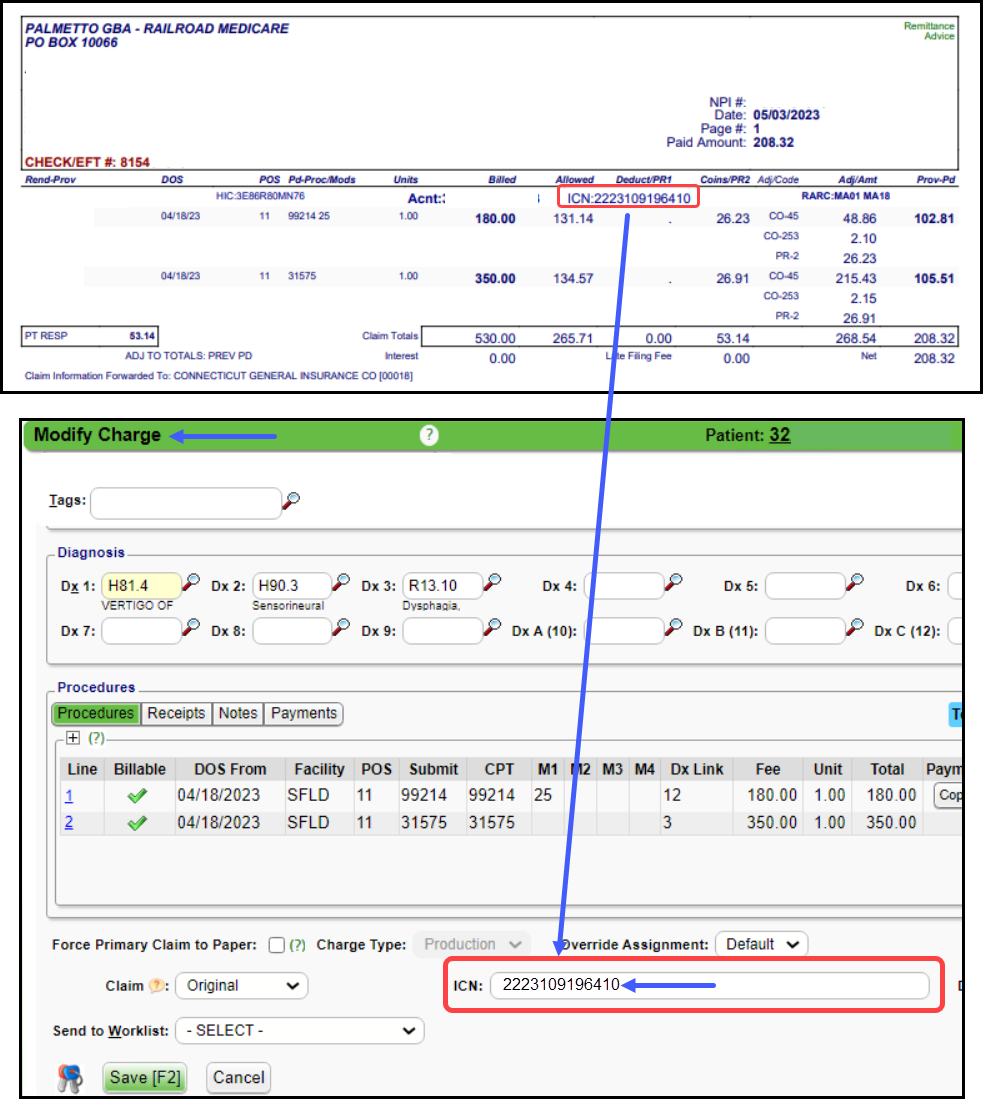
Re-adjudicated Payer Claim Control Number (ICN)

Claim Control Number on Previously Adjusted Claim Missing
A6 ACK/RETURNED - REQUESTS FOR RE-ADJUDICATION MUST REFERENCE THE NEWLY ASSIGNED PAYER CLAIM CONTROL NUMBER FOR THIS PREVIOUSLY ADJUSTED CLAIM. CORRECT THE PAYER CLAIM CONTROL NUMBER AND RE-SUBMIT. 

  1. The ICN Number is missing for a previously adjusted claim.
  1. Resolution: Find the ICN number on the Remit and add it to the Claim.

Reason Not Clear Payer Rejection

Reason is not Clear

Payer Rejection prefixes

  1. EP: Third-Party Clearinghouse
  2. AP: Payer

Contact the Payer

Payer Rejections can be more difficult to read as they often do not comply with standard responses.
  1. For Payer rejections that you cannot understand, you will need to contact the Payer directly if you are unsure how to make the corrections to resubmit the Claim.
  2. Keep in mind that this Claim has not entered the Payer adjudication system, therefore:
  • They will not be able to see the Claim, and
  • You will not have an EOB.
  1. Ask for the EDI Department for non-adjudicated claims.
  • Even though the Claim has not entered the adjudication system, the Payer should be able to clarify the meaning of the rejection.
  1. Have this information available:
  • Patient's name and date of birth
  • Policy Holder's name and date of birth if different than Patient.
  • Policy and Group Number.
  • Insurance Card should be loaded into the Patient Dashboard and/or the Ticket.
  • Payer Rejection Reason that was sent back into the System.
  1. If the Representative can answer the question, ask for the ANSI Loops and Segments the information needs to be in.
  2. Ask the Representative if the Policy Number is the correct one to use.
  3. If the Representative does not give you a clear answer, ask for another Representative.
  4. Ask if the Payer has a website where the information can be found.
  • If they do, get the website address.
  1. Ask for the name of the person you are speaking with.
  2. Get a Reference number for the call.
  3. Document the conversation in the Notes panel of the Encounter/Patient Dashboard and/or on the Worklist item.
  • Phone number that was called
  • Who did you speak with?
  • What is the Reference # of the call?

Options

  1. If the Payer accepts paper Claims, the HCFA can be mailed to the Payer.
  2. You may be able to file the Claim on the Payer's Web Portal.

Referral/Authorization Number Rejection

A6 -A3-;Rejected;Returned to Entity.;Payer-R VALID REFERRAL FORMAT REQUIRED-; [PE]

VA COMMUNI [VACCN] PAYER REJECTED
A6 -A3-;Rejected;Returned to Entity.;Payer-R VALID REFERRAL FORMAT REQUIRED-; [PE]

The Claim needs a Referral/Authorization Number.

Resolution
  1. The Referral always comes with an Authorization number that starts with VA.
    1. The Claims will not be processed without this VA number.
  2. Add a Charge Management Rule to prevent these Claims from being submitted without the Authorization/Referral Number.

Sequestration Missing

Sequestion CO253

Missing Sequestration Adjustment CO253.

Acknowledgement/Rejected for Missing Information. The Claim/Encounter is missing information specified in the Status details and has been rejected Status: Federal sequestration adjustment (CO253).

Rejected for: The Sequestration adjustment is missing.

Resolution: Post the Sequestration Adjustment CO253.

Missing Federal Sequestration Adjustment CO253

Payer Rejection: Acknowledgement/Rejected for Missing Information. The Claim Encounter is missing Information specified in the Status details and has been rejected Status: Federal Sequestration Adjustment

Medicare will provide the needed adjudication information when they submit a crossover claim to the payer on your behalf. You are receiving this rejection because the claim is missing a Federal Sequestration Adjustment amount (CO253) from Medicare’s claim consideration (835). 

Note: Medicare applies a 2% sequestration reduction adjustment to all Claim benefit payments.

  • When electronically submitting a secondary (COB) claim on which Medicare has made a payment, the Federal sequestration adjustment amount must be populated from the Medicare remittance using remark/reason code 253, in addition to all other Medicare payment and adjustment amounts. 

Service Date Invalid

A6 Service from Date - Invalid; Service from Date Must Be Valid for Payer [PE]
  • This Rejection is for DOS and may be due to:

    • An incorrect Payer ID.

    • Patient was not eligible on the DOS.

    • Patient no longer has this Insurance.

Smart Edit

Smart Edits Rejections

Medicare started the concept of Smart Edits. The Claim rejects at the Clearinghouse level with an alert explaining that the Claim may be denied when processed.

  • Some claims are rejected by a Smart Edit and do not enter the claims processing system. These claims must be corrected and resubmitted.

  • To be processed by Medicare, the claim must be resubmitted.

  • Other Smart Edits are informational only and will still be passed to the claims processing system for payment consideration.

  • The following link directs you to Palmetto GBA Advance Clinical Editing (P-ACE) Smart Edits

  • If you want to send the Claim without making any changes disregarding the Smart Edit warning, change the Claim Status to Ready for Submission/Resubmission.

    • The Claim response will now be Payer Accepted.

    • It will be adjudicated by the Payer and visible on the Payer portal.


UHC also utilizes Smart Edits, but their behavior is different from Medicare and likely more common.

  • If no Claim is resubmitted with changes, UHC will release the Claim for processing after 5 days.

  • If no changes need to be made, no additional Claim is required

  • If you want to make changes to the Claim based on the advice of the SmartEdit, make the changes, and send a new Claim which may be subject to a different Smart Edit.

UHC Smart Edit Example  

-A7-;Rejected for Invalid Information;Missing or invalid information. Usage- At least one other status code is required to identify the missing or invalid information.;-P4999REJINFO SMARTEDIT (REJINFO) [PATTERN 53845] INFORMATIONAL - THIS CLAIM HAS BEEN REJECTED AND WILL NOT BE PROCESSED. SEE UHCPROVIDER.COM/SMARTEDITS. REPAIRED CLAIMS SHOULD BE SENT WITH THE ORIGINAL FREQUENCY CODE, NOT A REPLACEMENT OR VOIDED INDICATOR-;-A7-;Rejected for Invalid Information;Missing or invalid information. Usage- At least one other status code is required to identify the missing or invalid information.;-P4999LBI SMARTEDIT (LBI) REJECT - PER LCD OR NCD GUIDELINES, PROCEDURE CODE 99406 HAS NOT MET THE ASSOCIATED DIAGNOSIS CODE RELATIONSHIP CRITERIA FOR CMS ID(S) 210.4.1.-;-Payer Claim Control Number - FLN 940252306498700 ICN FF83454140-; [PE]

  • The green highlighted items represent the Smart Edit Code that can be used in the lookup on UHC's Smart Edit page: Smart Edits Lookup

  • The yellow highlighted items provide the status of the Claim and a reason why the Claim was rejected.

Learn More

Resubmit Claims


Status Code

Rejection: Missing or invalid information. Usage- At least one other status code is required to identify the missing or invalid information.;-Clm| Member ID (Loop 2010BA, NM109)

PAYER REJECTED: A6 -A3-;Rejected; Missing or invalid information. Usage- At least one other status code is required to identify the missing or invalid information.;-Clm| Member ID (Loop 2010BA, NM109) is invalid. Invalid Data XGC000000M000-; [PE]

  • Member/Subscriber ID/Policy Number is invalid.

Resolution

Verify/Change the Insurance/Policy Number.


Sub-Element SV101-07

PE SUB-ELEMENT SV101-07 IS MISSING

IT IS REQUIRED WHEN PROCEDURE CODE IS NON-SPECIFIC (SV101-02 IS J3301). SEGMENT SV1 IS DEFINED IN THE GUIDELINE AT POSITION 3.

  • The non-specific Procedure Code needs a more detailed description.

Resolution: Add a detailed description in the Note Field on the line item.

  • According to EDI, they move the info to the correct place

  • NOC (Not Otherwise Classified) codes need a description by Medicare standards.

  • Some Medicare replacements also require this.

  • This is sent in 2400 Loop. 


    • Related Articles

    • Payer Rejection Articles

      Payer Rejections Payer Rejections Overview Acknowledgement/Receipt Payer Rejection: A6 -A1-;Acknowledgment/Receipt Adjudication Date Payer Rejected: INVALID ADJ PAYMENT DATE Claim Filing Indicator (CFI) Payer Rejection: INVALID FILING INDICATOR CODE ...
    • Payment/Receipt FAQs

      Adjustments/CARC Codes How can I post additional Adjustments? Post an Adjustment from: Payment Dashboard Patient Dashboard Encounter Dashboard Learn More Multiple Adjustment Lines Rebill the Claim from the Adjustment screen Adjustment Transaction ...
    • Charge/Claim FAQs

      Charge/Claim FAQs Attachments How do I indicate there is attached paperwork? Attached Paperwork Attending Physician What is an Attending Physician? Attending Physician An Attending Physician is the one who is responsible for the overall care of a ...
    • Payer Rejection: INVALID FILING INDICATOR CODE 'CI'

      PE: A6 PSBR0905-INVALID FILING INDICATOR CODE 'CI' PSBR0906-INVALID FILING INDICATOR CODE 'CI' The Claims Filing Indicator (CFI) is not correct. Resolution: Check the Claims Filing Indicator on the Insurance. Example: The CFI is CI (Commercial) in ...
    • Add/Modify a Procedure Code (CPT)

      CPT® Codes (Current Procedural Terminology) is a uniform medical language that defines the Procedures or Services performed by a qualified healthcare professional. They are referred to in the System as CPT or Procedure Codes. Adding fees directly to ...