Rejection: Etactics Cannot Print Claims without the Full Payer Address
Reason for Rejection
If you send primary claims to our clearinghouse to print, the Insurances Library must contain a full address.
To fix this rejection:
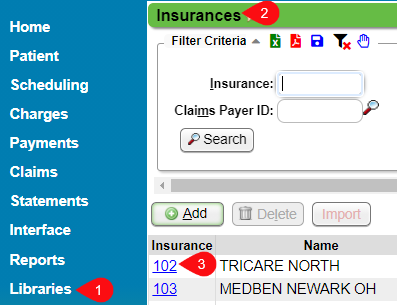
Select Libraries on the left Dashboard menu.
Select Insurances to go to the Insurances Library.
Select the Insurance ID for this Encounter.
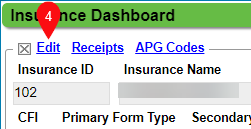
Select Edit.
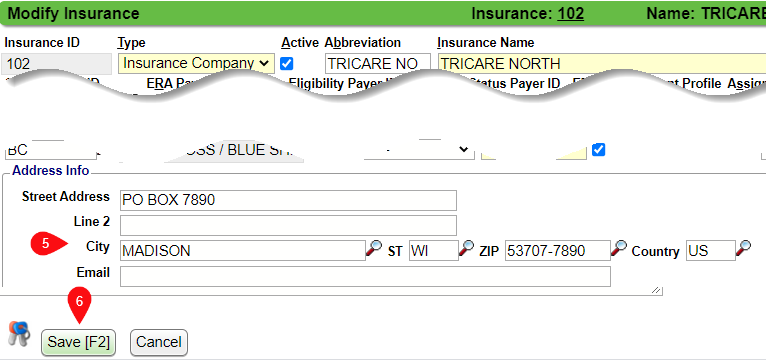
Add the full payer address.
Select Save [F2].
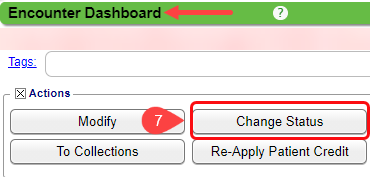
On the Encounter Dashboard, change the Claim Status to Ready for Submission/Resubmission.
Related Articles
Clearinghouse Rejection Articles
If the Subscriber State (AB) is a Canadian province then Subscriber Zip Code (AB T8L0S2) must be six characters Referring Provider (23010A) is required to be a person 2300 NTE02 has a character limit of 80 characters Service Line 1 COB Claim ...
Print EOBs for Paper Claims
Print an EOB for Paper Claims On the Encounter Dashboard, an EOB can be printed along with the Secondary/Tertiary Paper Claim that is printed on Plain Paper. EOBs can be printed for Payments that were posted manually. In the Policy Breakdown panel on ...
Payer Rejections
Payer Rejections Overview Payer Rejections Overview When a Claim is submitted electronically, the information on the individual Claim is matched with the information the Payer has on file. If the information is not in alignment with the Payer ...
Print One or Multiple Paper Claims
Print One Claim at a Time from the Encounter Dashboard From the Encounter Dashboard, select the Print Claim button. Set Status to Printed: If selected when you Run to generate this claim, the Encounter Status will be updated to PRINTED. Print Claim ...
Claims Management Dashboard
Claims Management Dashboard Claims Management Dashboard Overview Claims can be manually batched and uploaded at any time, or the Job Scheduler can be used to automate the Claims batching and upload process at a pre-set day and time. Close the ...